Bringing genetic predictions to life
Helping expecting parents connect with their baby while making genetic uncertainty clear.
My role
Founding Designer
I led design and product management for BabyPeek, from early exploration through launch.
I led user research, shaped product direction, and designed the consumer experience. After launch, I iterated on checkout, sharing, and growth experiments.
My partners
- Product manager
- Engineering
- Marketing
- Clinical
- Legal
Helping parents connect without promising certainty
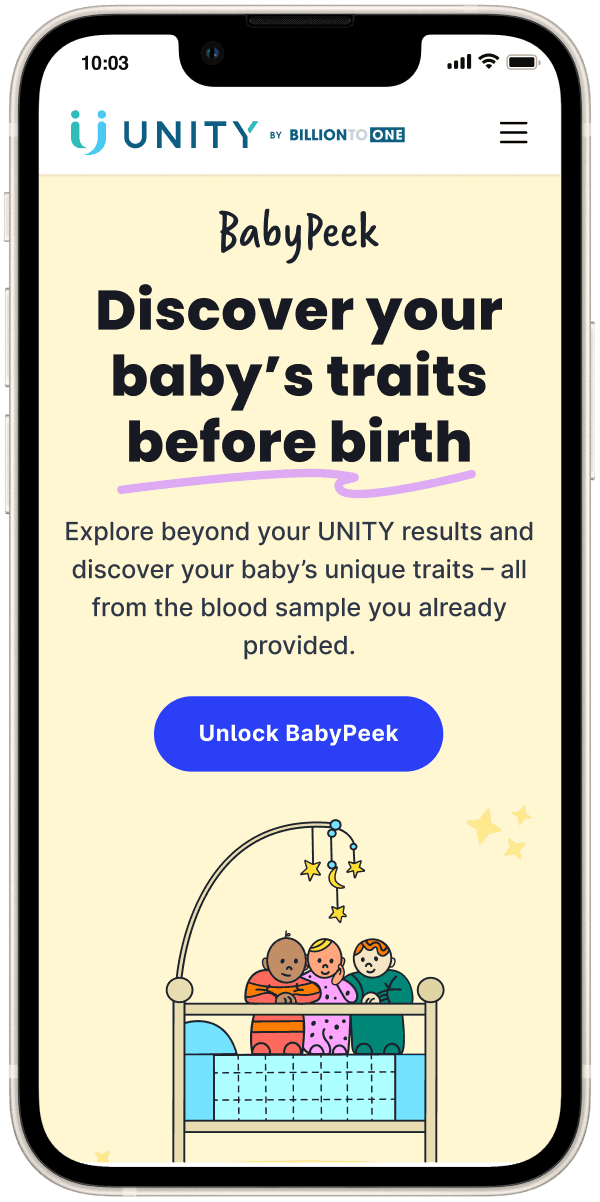
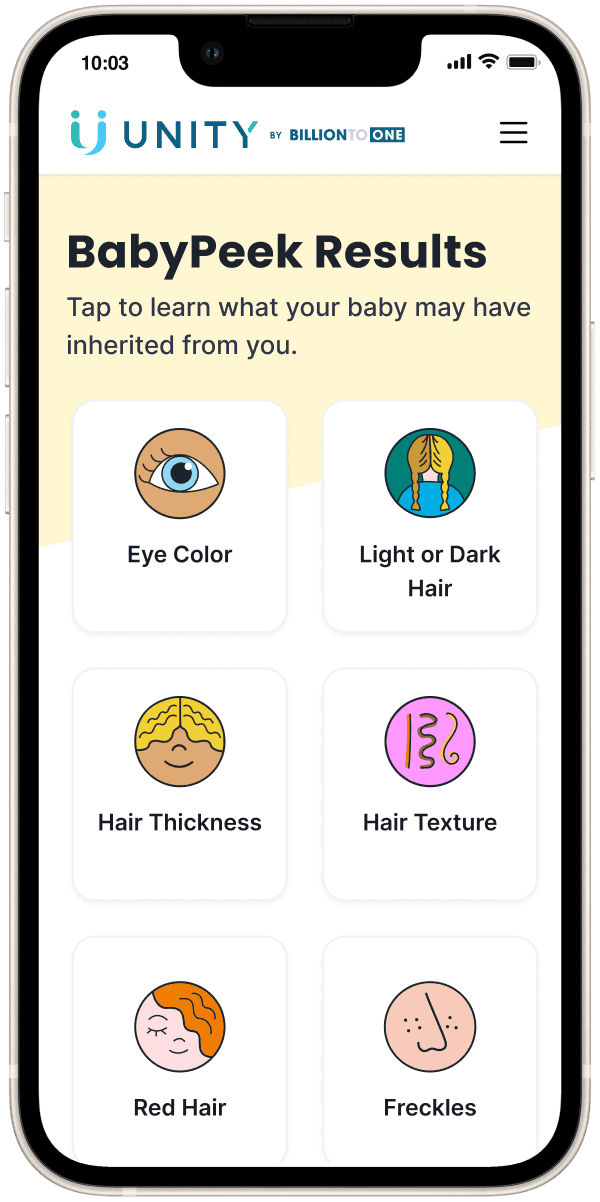
BabyPeek offered expecting parents predictions about their baby's traits, from eye color to hair texture, using the blood sample already collected for a clinical screening test.
I designed the experience to help parents picture their baby while understanding that every prediction was a probability. The product also had to give people a reason to discover it, pay for it, and share the experience.
Results at a glance
- Conversion
- +75%
- Overall conversion rate increase
- Satisfaction
- 4.8/5
- User satisfaction rating
- Campaign shares
- 4,000+
- In a single five-day campaign
- Social posts
- 2,000+
- #babypeek on social media
BabyPeek still missed its standalone revenue target. The team repositioned it to support adoption of UNITY, BillionToOne's clinical screening test.
The Result Experience
Warmth first, then the whole truth underneath
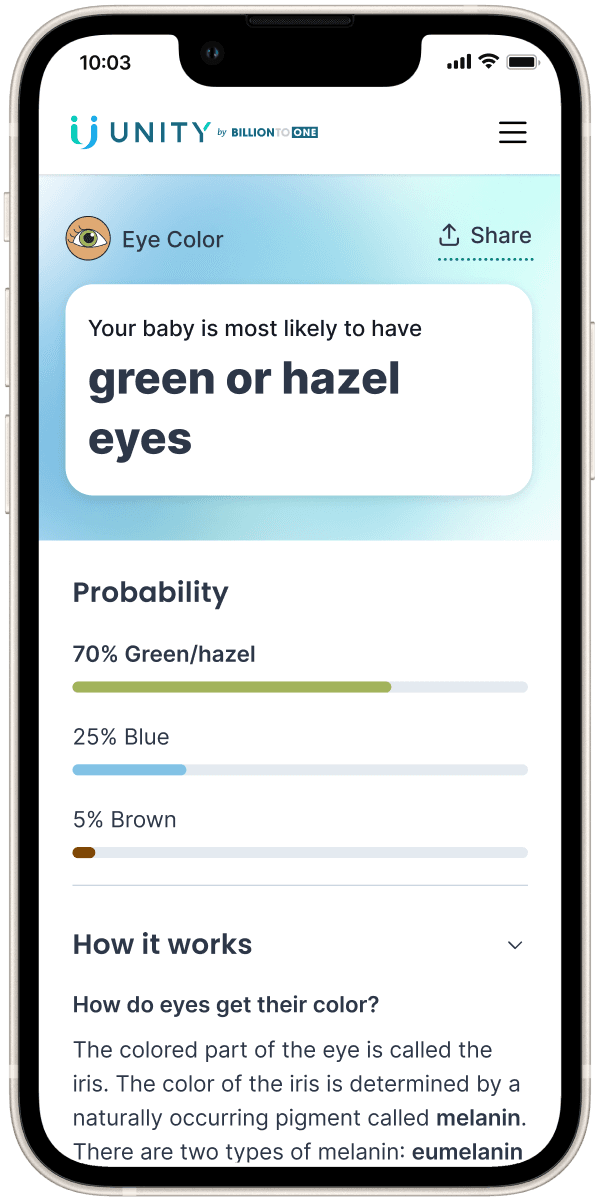
Every trait result opens with a sentence a parent can repeat out loud, on a card colored as the trait itself. The probability sits underneath it, and it shows the full spread rather than only the winning answer. Green or hazel at 70%, blue at 25%, brown at 5%, with each bar colored as the eye color it stands for.
That was the honesty mechanism. Naming the alternatives and their weight is what stops a confident headline from becoming a promise.

Three possible outcomes, so the probability is a stack: 70% green or hazel, 25% blue, 5% brown. Each bar is colored as the eye color it stands for.

One likelihood, so it gets a dial instead. Underneath, a drawing of why follicle shape makes hair curl, and the TCHH gene marked on chromosome 2.

The traits people actually repeat at dinner. Sharing was designed for here, not discovered later.
Make the limits part of the experience
Every screen carries an Other factorssection, which is the part I argued hardest for. Eye color admits that babies' eyes often change from blue to brown in the first two years. Hair texture lists products, hormones, humidity, and ethnicity, each with its own drawing. It is where the product volunteers what it cannot know, inside the experience rather than in a disclaimer nobody reads.
The science sits behind progressive disclosure. Open “How it works” and you get eumelanin and pheomelanin, or a drawing of how a follicle's shape decides whether a strand curls. Closed, the screen is a warm sentence and a number.
The mandate
“Make BabyPeek a social phenomenon.”
Research
Six personas revealed four growth signals
I combined behavioral analysis with 20 interviews across purchasers and non-purchasers who had reached the information page. I wanted to understand why people acted or stopped after showing initial interest.
I synthesized six composite personas and shared the findings with product, marketing, and engineering leaders before feature work. Each persona pointed to a different opportunity or a limit to what we could change.
Adventurist
Bought BabyPeek and recommended it to others.
Word of mouth
Advice Seeker
A partner influenced the purchase decision.
Shared experience
Frugal Shopper
Wanted it and trusted it, but could not justify $99.
Affordability
Mom of Three
Trusted the brand, but had little interest.
Not a conversion target
Skeptic
Needed science, reviews, and privacy answers before buying.
Trust
Surprise Lover
Would not buy, but would refer someone else.
Word of mouth
I focused growth ideas on people who wanted BabyPeek or would recommend it. Genuine lack of interest set a boundary. Better messaging would not make everyone want to know their baby's traits.
Explore the full persona artifacts
Adventurist
Product ideas
How I turned the signals into product ideas
The funnel showed where to act: 45% of patients opened the BabyPeek information page, and 4.5% purchased at $99. The persona signals helped explain what we could try. I combined those signals with funnel location and feasibility to frame three growth hypotheses.
Word of mouth
Reach
The Adventurist already recommended BabyPeek. The Surprise Lover would refer others even without buying.
Hypothesis: Helping people recommend and share BabyPeek could bring more parents into the purchase journey.
Product ideas: Referrals, shareable results, and lifecycle marketing.
Shared experience
Perceived value
The Advice Seeker involved a partner in the decision. Experiencing BabyPeek together could make it more meaningful.
Hypothesis: Creating anticipation and participation with partners, friends, and family could make BabyPeek feel more worth purchasing.
Product ideas: Trait reveals, printable games, and partner participation.
Affordability
Price
The Frugal Shopper wanted BabyPeek and trusted it, but could not justify $99.
Hypothesis: Reducing the cost could help interested parents complete a purchase.
Product ideas: Live tests at four prices and ways to earn free access.
Trust shaped every direction
The Skeptic needed science, privacy, and reviews explained before buying. I treated trust as a requirement across all three directions: clear scientific explanations, privacy answers, reviews, and honest communication of probabilities and limitations.
All three directions moved forward. The next sections focus on perceived value and price, where the product design decisions were most consequential. Partner participation remained an idea we chose not to build.
Affordability + word of mouth → Share to unlock
An affordable way in, with sharing as the exchange
The Frugal Shopper wanted BabyPeek but could not justify the price. The Adventurist already recommended it to others. Share to unlock connected those signals: parents could earn free access by posting about BabyPeek, helping others discover it.
Legal did not approve unconditional free access alongside a clinical test, so access had to be earned. Buying remained available for people who were not ready to announce their pregnancy publicly.
Testing turned five steps into one screen
Users understood the exchange but struggled to complete it. They did not know what to post, got lost in the promo code process, and missed verification below the fold.
I brought posting, verification, and unlocking into the first screen, applied the promo code automatically, and provided sample captions and images as optional help.
Before
After
Shared experience + trust → Printable games
Make the reveal something people could experience together
The Advice Seeker showed that a partner influenced the decision. I explored ways to make anticipation and participation part of BabyPeek's value, while keeping the science clear for people who needed more evidence before buying.
Our PM proposed an online guessing game that used parents' traits before revealing the baby's prediction. I wireframed it to show the problem: the sequence implied that parents' answers produced the prediction. It actually came from the baby's DNA. We agreed to shelve that version.
I kept the shared reveal and changed the mechanism. I asked coworkers to invite me to baby showers, attended a few, and observed what people played. I then designed three printable games where friends and family could participate without suggesting their guesses generated the genetic prediction.
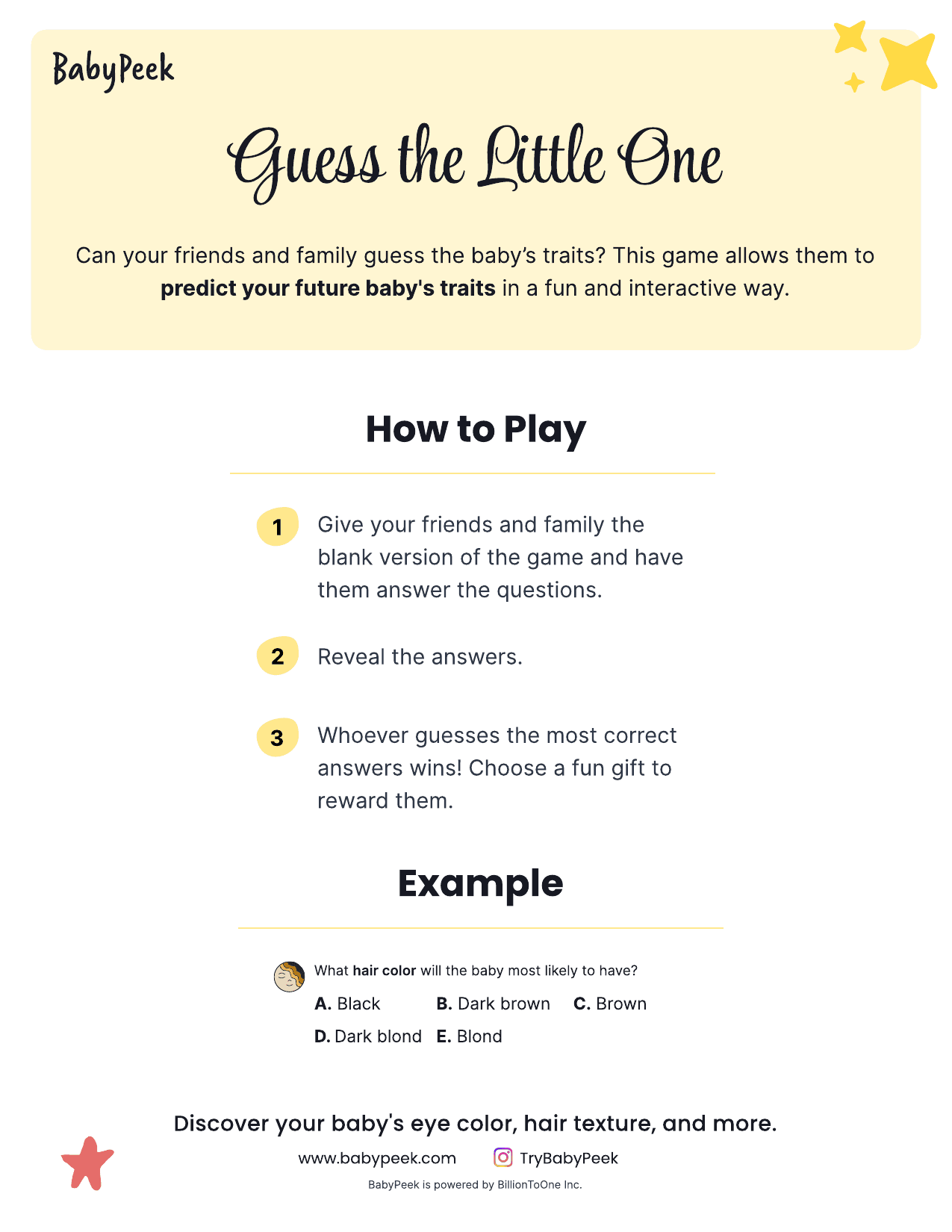
Guess the Little One
Create a shared reveal: friends and family guess, then the report reveals the predicted traits.
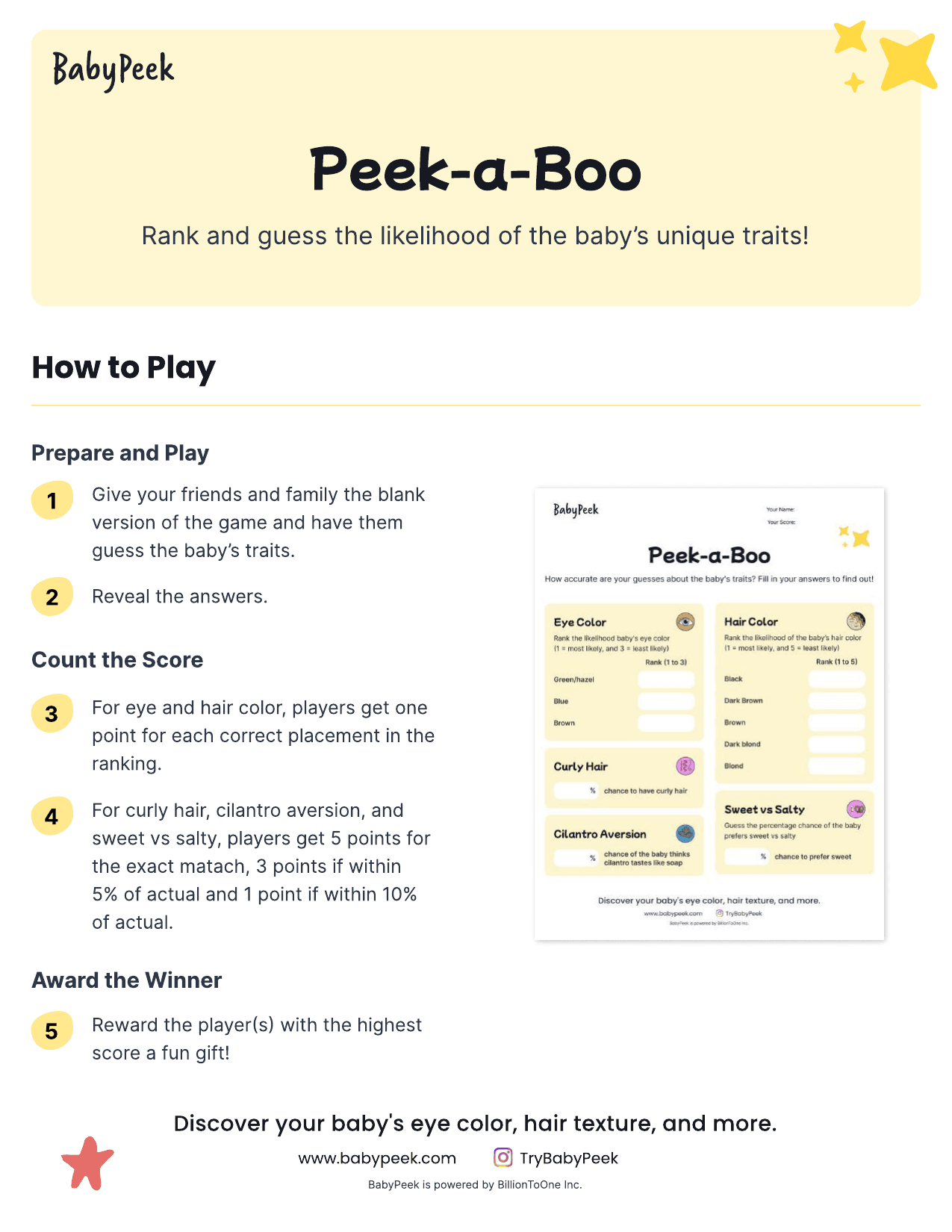
Peek-a-Boo
Make probability part of the game: players rank likelihoods and score points for how close their estimates are.
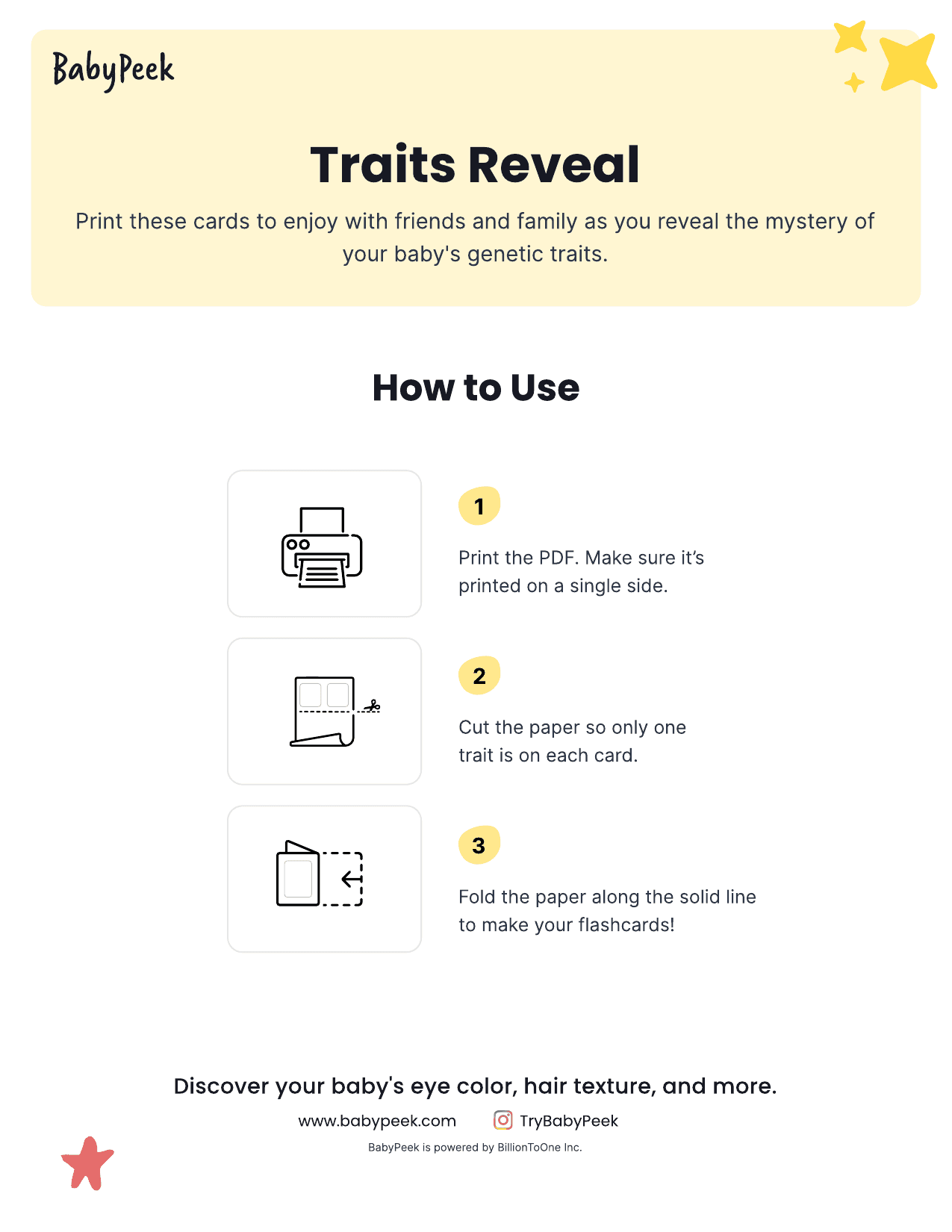
Traits Reveal
Bring the results into a gathering: printable trait cards give parents a way to reveal them to friends and family.
Teach probability through play
Peek-a-Boo is the one I'm proudest of. Players rank how likely each eye color is, then guess the percentage chance of curly hair or cilantro aversion. Scoring gives five points for an exact match, three if you land within 5%, one if you land within 10%.
That is probability calibration as a party game. To play it well you have to think in distributions and accept that a confident answer can still be wrong, which is exactly what this product needed people to understand. Nobody sits through that explanation. They will play it at a baby shower.
The page copy does the same job in one line, reaching for something people already reason about correctly:
“Much like a weather report, results are calculated as probabilities.”
Then we worked through the rest of it
The three hypotheses were where we started, not where we stopped. Over the following year I shipped most of the option space: lifecycle marketing, influencer collaborations, checkout experiments, science clarification, customer reviews, shareable trait results, the reveal moments above, and a price test across $149, $99, $29, and $9.99.
Two things we chose not to build: a physical keepsake book, too expensive to produce for the return, and partner participation. The shipped landing page is the clearest record of everything else.

The shipped page: 12 traits, the games block, 4.8 stars across 100+ reviews, an influencer film, gene-level explainers, and an FAQ answering the two questions everyone asked. Nearly every branch of the plan, live on one page.
Conversion improved. The business model changed.
BabyPeek's conversion rate increased by 75%, but it missed its standalone revenue target. My read was that conversion improvements alone could not overcome the limited audience and price needed to make it a meaningful revenue line.
The team repositioned BabyPeek as a reason for patients to ask their doctor for UNITY, the clinical screening test it accompanied. Its value shifted from direct consumer sales to supporting adoption of the clinical product. The lesson was to evaluate whether experiments strengthened the business model, alongside whether they improved the funnel.
What I Took Away
Legal constraints produce better design problems
The inducement restriction that stopped us handing BabyPeek out for free forced a mechanism that was simultaneously compliant, viral, and respectful of the user. It was a better answer than the one we were prevented from giving.
The honest version of a feature is usually still a good feature
The guessing game didn't need to be killed. It needed the part that misrepresented the science removed. Getting to that took wireframes rather than argument, and the result kept what my PM was right about.
What I would do differently
Research gave us signals about price, trust, and shared experience. I should have tested which motivations were strong enough to drive action before scaling a campaign. Interest in sharing with family did not mean people were ready to announce a pregnancy publicly. I would use smaller tests to separate those motivations before committing to a larger launch.